
Skip to content
Odoo FBR Digital Invoicing for Pakistan

FBR Digital Invoicing in Odoo. Every invoice reported, automatically.

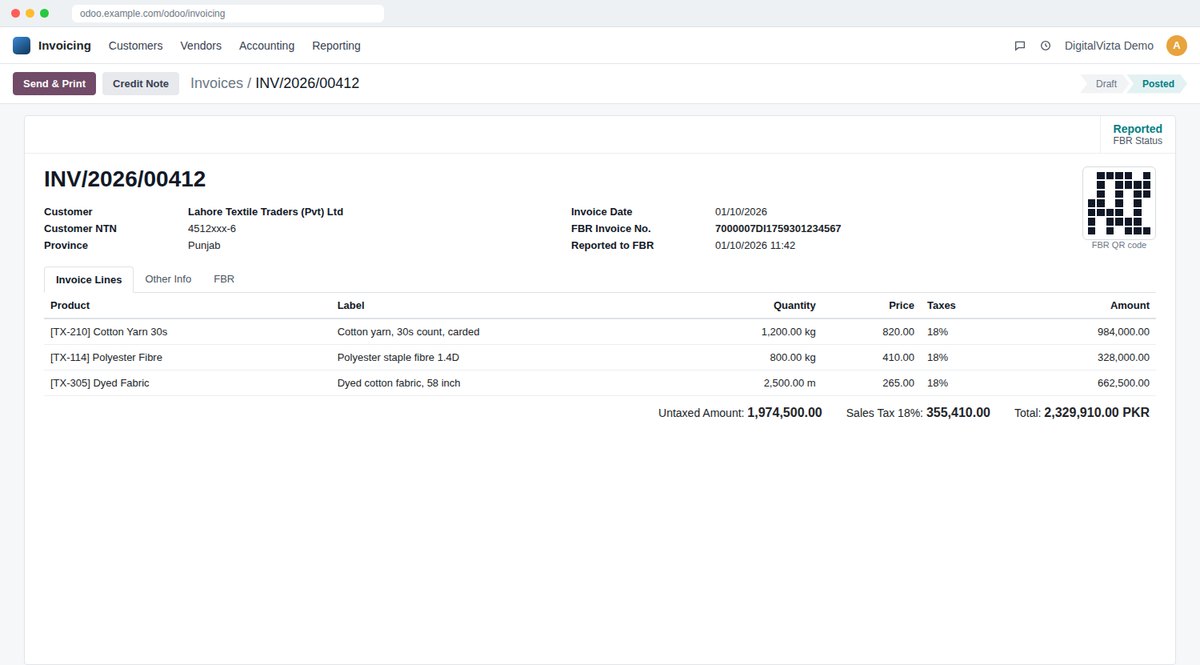
We connect Odoo invoices and Odoo POS to FBR, so every sales-tax invoice is reported in real time and prints its FBR invoice number and QR code. Your team keeps working in Odoo as usual.

  • FBR Digital Invoicing
  • FBR POS integration
  • PRAL or licensed integrator
  • Urdu & English training
What the rules say

E-invoicing in Pakistan at a glance

PK

Pakistan

FBR (Federal Board of Revenue)

FBR Digital Invoicing is mandatory: Every sales-tax registered person must issue e-invoices through FBR Digital Invoicing, via PRAL or an FBR-licensed integrator. The phased deadlines ended on 31 December 2025. Tier-1 retailers and restaurants must also integrate their point of sale.

System
FBR Digital Invoicing, plus POS integration for Tier-1 retailers
Who must comply
Every sales-tax registered person, with no turnover threshold. Tier-1 retailers and restaurants must also integrate their POS.
How it works
Each sales-tax invoice is sent to FBR in real time through PRAL or an FBR-licensed integrator, and FBR returns a unique invoice number.
Invoice must show
FBR invoice number and QR code printed on the invoice. Errors can be corrected only within 72 hours.
How we connect Odoo
A DigitalVizta connector sends posted Odoo invoices and POS orders to FBR, stores the FBR number and prints the QR code.
What we set up

Everything around the invoice, not only the connection

  • Odoo invoices sent to FBR through PRAL or your licensed integrator
  • FBR invoice number and QR code saved on the invoice and printed
  • Odoo POS receipts reported to FBR for Tier-1 retailers and restaurants
  • Federal sales tax and provincial sales tax on services set up
  • All invoice types tested in the FBR sandbox before go-live
  • Failed invoices flagged at once, inside the 72-hour window
How we do it

From readiness check to live invoices

  1. Readiness checkWe review your Odoo version, taxes, customers and invoice layout.
  2. Set up & connectTaxes, layouts and the FBR connection configured.
  3. Test firstEvery invoice type tested in the sandbox before go-live.
  4. Go live & supportWe watch the first invoices and fix any rejection fast.
Free readiness check

Is your Odoo ready for FBR?

Tell us your Odoo version. In a free 30-minute call we check what is missing and give you a fixed plan.

Who must use FBR Digital Invoicing?

Every sales-tax registered person in Pakistan, with no turnover threshold. The phased deadlines ended on 31 December 2025, so it applies now. Tier-1 retailers and restaurants must also integrate their point of sale.

Can Odoo connect to FBR?

Yes, with a connector we build and test for you. Posted Odoo invoices are sent to FBR Digital Invoicing through PRAL or your FBR-licensed integrator, and the FBR invoice number and QR code are saved and printed on the invoice.

We use Odoo POS in our shops. Can it report to FBR?

Yes. We connect Odoo Point of Sale so each receipt is reported to FBR and prints the FBR invoice number and QR code.

PRAL or a licensed integrator?

Both work. FBR also allows more than one licensed integrator. We connect Odoo to the route you choose.

What if an invoice is wrong?

FBR allows corrections only within 72 hours of the invoice. The connector flags failed or rejected invoices at once so you can fix them in time.

Book your free readiness check

Prefer to pick a time now? Open the calendar →

We reply within one business day. Your details are never shared.

Tax rules change often. Information on this page was checked in October 2026, confirm current requirements with FBR or your tax adviser.

WhatsApp